
Calling the LLM is the easy part.
and a way to know if it's giving the right answers.
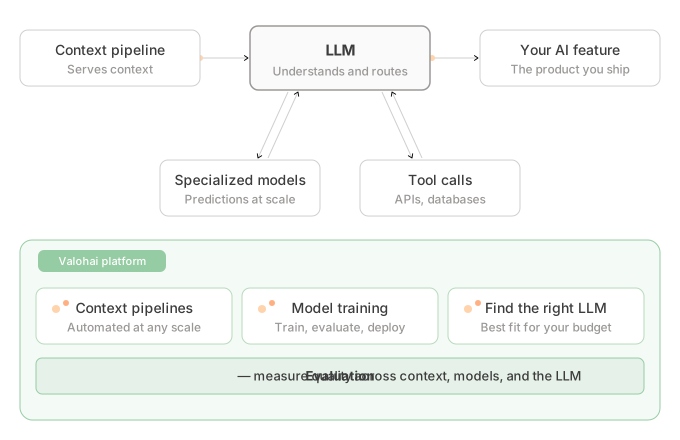
AI products are changing shape.
Here's what shipping them actually takes.
LLMs do the talking.Specialized models do the work that decides the answer.
Classifying 100,000 support tickets a day, detecting anomalies in real time, predicting churn before renewal. These run on models trained on your data, working alongside the LLM. The LLM stays in front. The specialized models bring the precision your domain needs.
You'll end up with more models than you planned.Built by more people than you expected. Not just your ML team.
A year ago, training a model meant a dedicated ML engineer. Today, any software engineer with a coding assistant can build and ship one. More features, more use cases, more models. All of them need to be evaluated and managed alongside the LLMs they support.
AI products aren't shipped once.Models need retraining. Data drifts. Costs change.
Cloud bills can climb quietly when nobody tracks what each request costs. Quality can drift down without triggering uptime or latency alerts. A model can get retrained by another team and deployed without a clear changelog. The infrastructure around your AI determines whether these stay manageable or become surprises.
Want the 2-minute version?
A quick executive summary of why this matters and what to ask your team.
Read the summary →The "just ask the LLM" phase
Question
"Projected yield?"
LLM
Guesses from training data
Answer
"Exactly 14,847 units"
With specialized models
Question
"Projected yield?"
LLM
Routes to the right model
Forecast model
Trained on your data
Answer
"12,400 units, ±8%"
Platform
Agent skills
Files read and written in a local directory, parameters via argparse, metrics printed as JSON. Common Python conventions, nothing Valohai-specific. The platform syncs your files with cloud storage, versions every run, and stays out of your code.
That's why the upskilling path is gentle, and why Agent Skills work so well. Migrating is rinse and repeat: rewrite file paths, lift parameters into argparse, print metrics as JSON. Claude Code, Cursor, and Copilot apply those changes across your scripts. You save the time. Your code stays portable.
See how Agent Skills work →> Use the Valohai skills to migrate this project.
Scanning project structure...
Detected: PyTorch, transformers, scikit-learn
Rewrote file paths → /valohai/inputs/, /valohai/outputs/
Lifted parameters into argparse (7 found)
Added JSON metric printing (train.py, eval.py)
Generated valohai.yaml (3 steps)
vh lint passed
Ready to run: vh execution run train-model --adhoc
Installnpx skills add valohai/valohai-skills --allOne platform. Every model.
Pipelines
Build it step by step. Run it end to end.
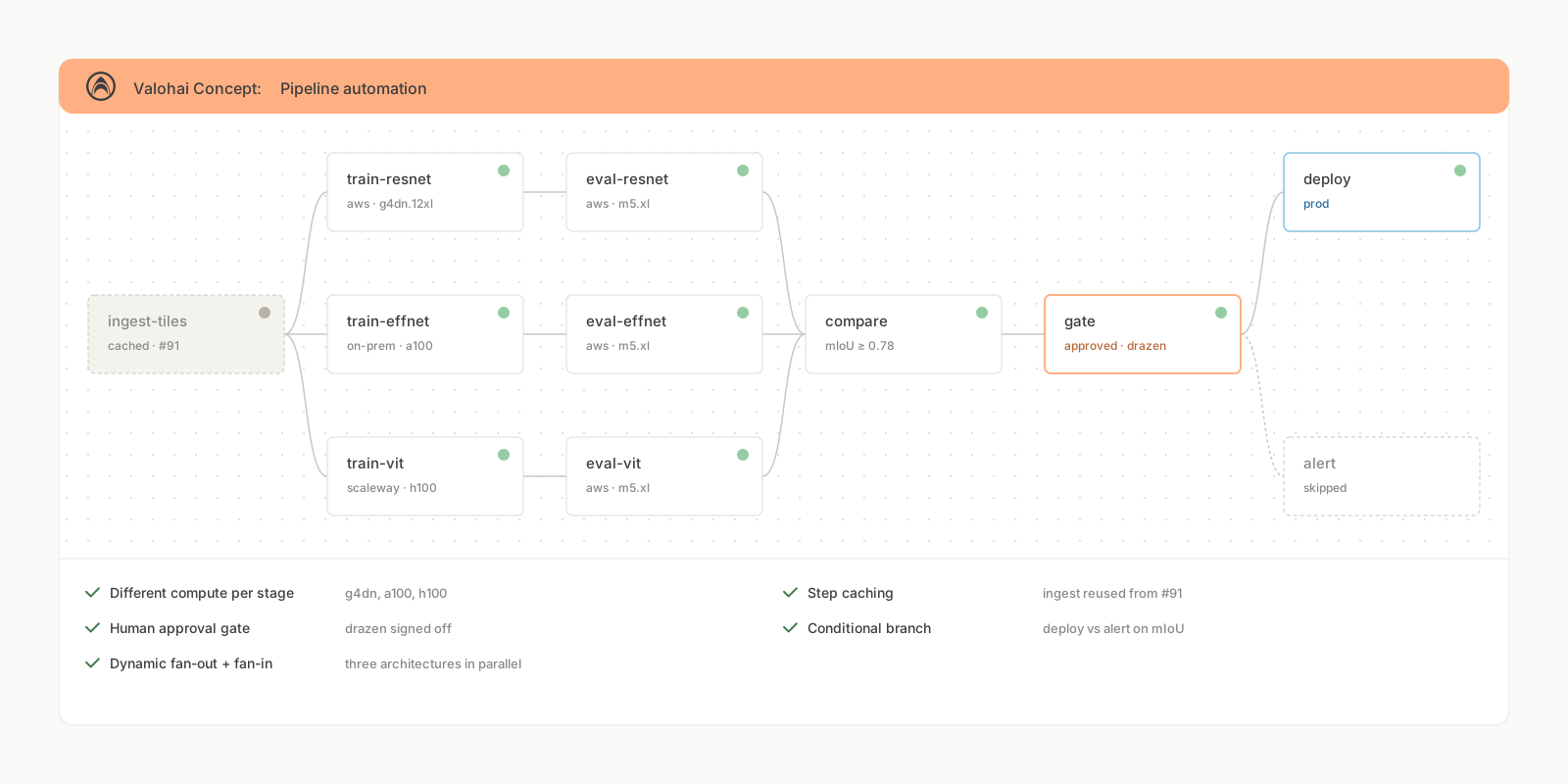
One pipeline definition covers experimentation and production. Define your workflow as connected steps. Each one runs a script, compares results, calls an API, or whatever your process needs. Each step caches independently, so only what changed reruns.
Conditional logic & quality gates
Control what happens next based on results. Accuracy didn't improve? Skip the next step. Cost per query too high? Branch to a cheaper model. New version doesn't beat the baseline? Block the deployment.
Parallel execution
A single task node spawns 4 to 100+ parallel executions, whether that's training across architectures or sweeping across model and prompt combinations. Results flow into the next step for comparison and ranking.
Human-in-the-loop approvals
Pause the pipeline until someone signs off. Review results before promoting a model. Approve a dataset before a large training run. Gate a deployment behind a manual check. Failed pipelines restart from the last successful step.
Datasets
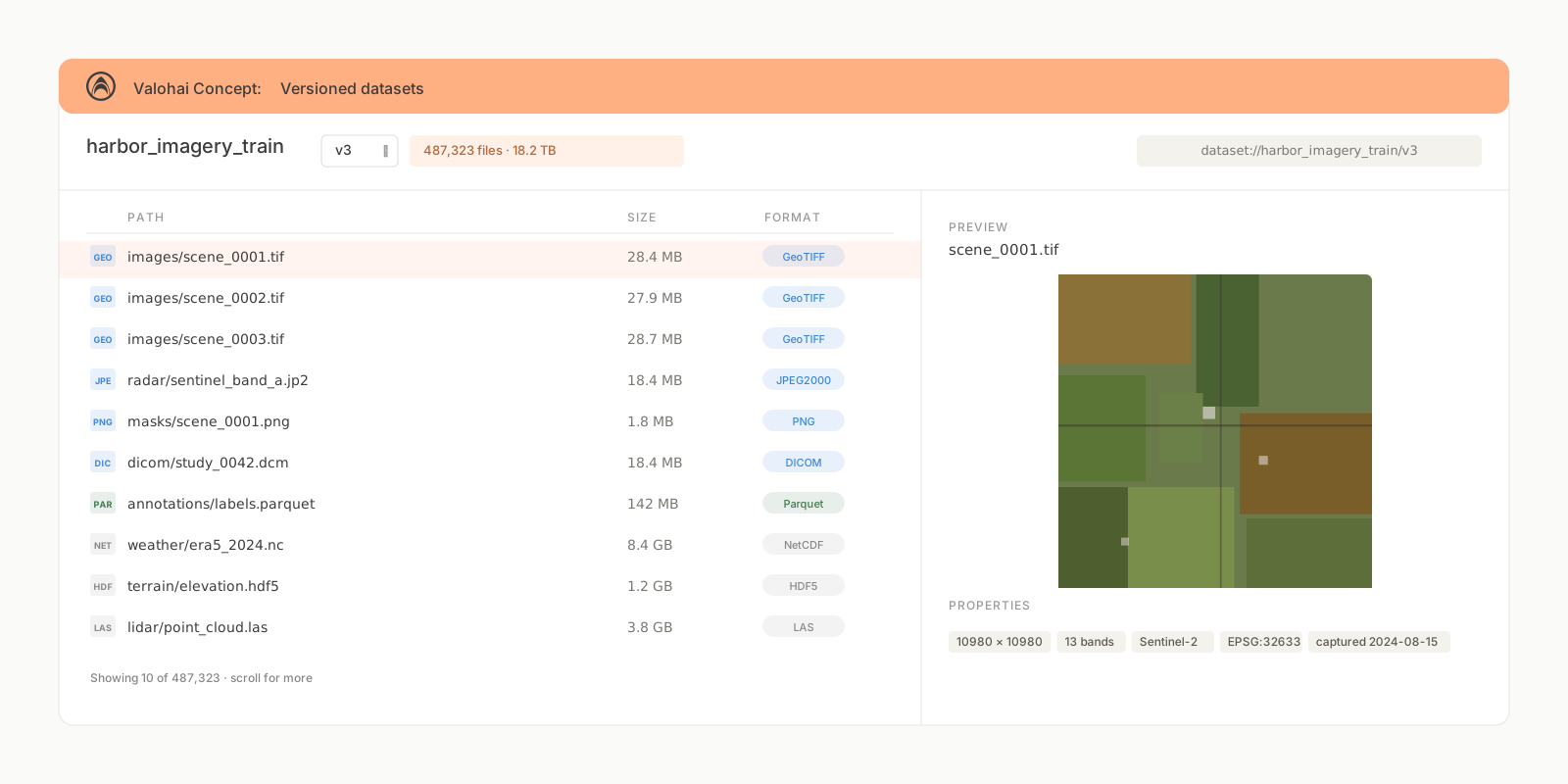
18TB? Download once.
Versioned, immutable, and cached at any scale. New versions track which files were added or removed, not duplicate the entire dataset. Updating your evaluation corpus with this month's production samples? Only the new files get stored.
Cached across every execution
Download a dataset once. Every execution reuses the cache, whether that's local to a machine or on shared storage. When a new version adds files, only the new files download.
Smart versioning without duplication
Each version references existing files plus additions. Remove mislabeled samples or add new evaluation examples, and a clean version appears instantly.
Aliases for promotion
Point production-data to any version. Update the alias, not your code. Works the same whether your dataset is satellite imagery or a document corpus for RAG evaluation.
RAG AND LLM EVALUATION
Stop tuning by hand.
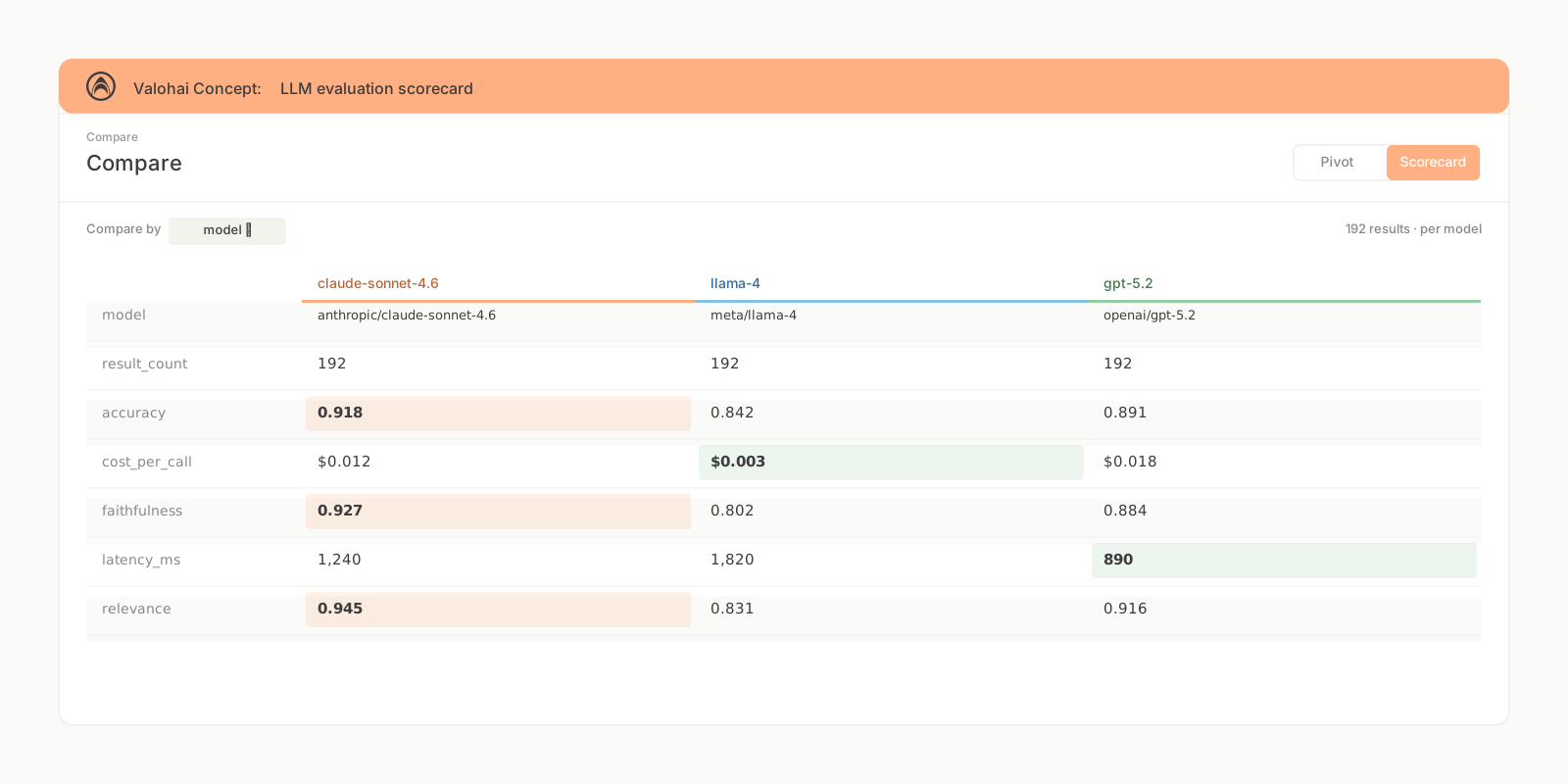
Sweep across chunk sizes, embedding models, retrieval strategies, and prompts systematically. See what actually works on your data, with cost right next to quality.
Multi-model comparison
Evaluate 3+ models against your datasets with one call. See quality, latency, and cost per token across every combination.
Run anywhere, even locally
pip install valohai-llm, set an API key, and start posting results. No infrastructure lock-in.
Deep tracing with Langfuse
Every evaluation links to a full trace: prompt chains, token counts, latency. Click through for root cause analysis.
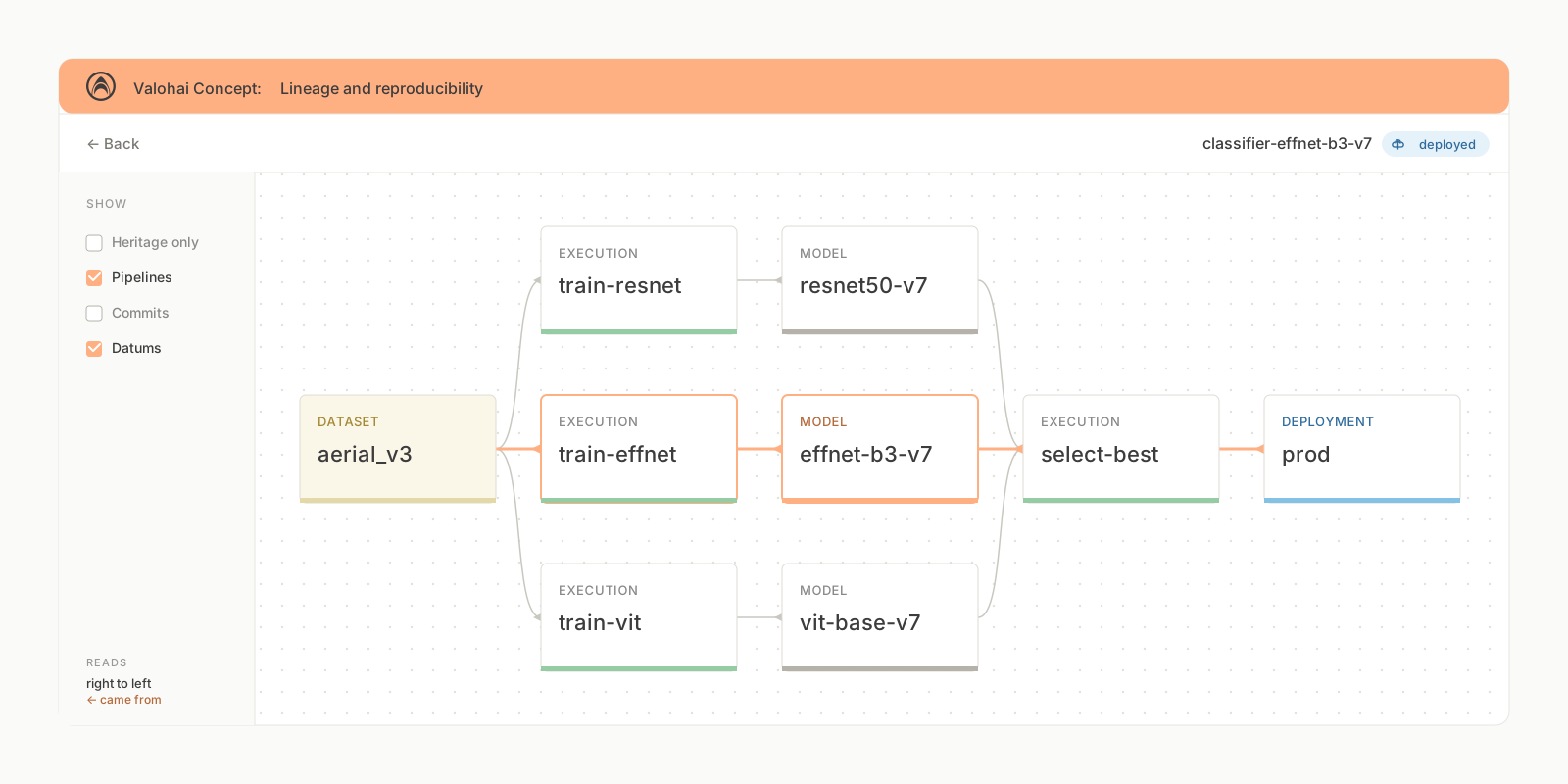
Lineage & traceability
Trace any model back to the data that built it.
Every file, every execution, every dataset version, automatically tracked. No manual logging. No detective work when a teammate asks what changed between the last two model versions, or which prompt version is running in your support chatbot.
Which execution created this model?
Click any model and see the full execution trace, parameters, and code version.
What data was it trained on?
Trace backward through pipeline steps to the exact dataset version and preprocessing.
Where is it deployed?
Trace forward and see which deployments and environments use this model version.
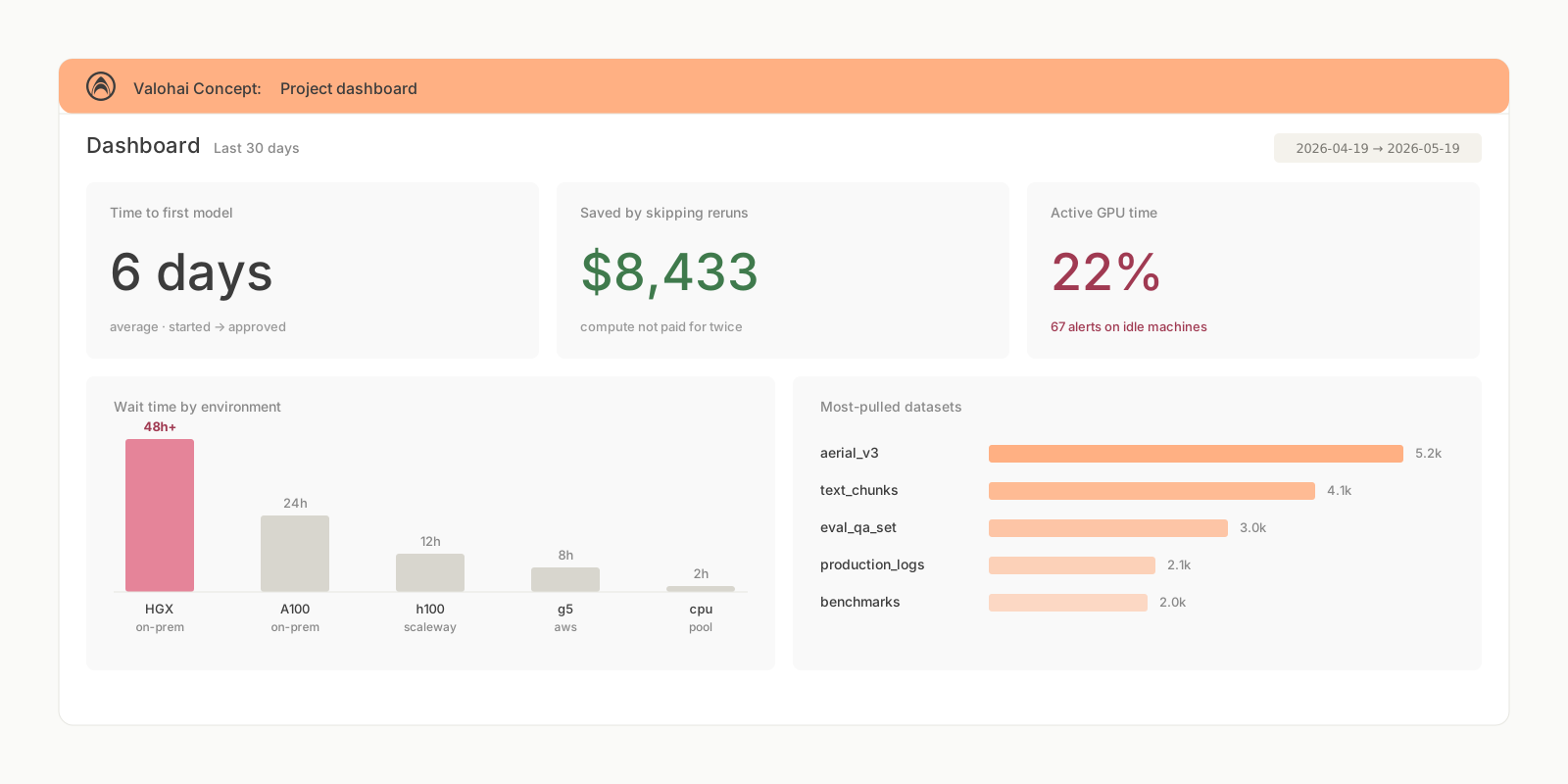
Operations Dashboard
Stop stitching dashboards together.
Costs in your cloud console, queue times in your infrastructure dashboard, model performance in your experiment tracker, LLM evaluation results in yet another tool. One dashboard pulls compute spend, quality metrics, and infrastructure utilization together, automatically.
Cost and time savings, quantified
Reused compute, cached datasets, parallel evaluations. See exactly what your infrastructure saved you. Actual numbers, from your actual workloads.
Quality vs. cost, visualized
Which configuration meets your quality bar at the lowest cost? Scatter plots, Pareto frontiers, constraint filtering. Stop paying GPT-4 prices for tasks a cheaper model handles just as well.
Find the bottleneck, not the excuse
Peak wait times by environment, GPU utilization across your fleet, workload distribution. Your team is queuing for A100s while suitable alternatives sit idle. Now you can see it.
… and that's not half of it!
Systematic sweeps
Run hundreds of configurations in parallel. Hyperparameters, prompts, models, retrieval strategies. Find what works, systematically.
Docs →Distributed training
Multi-GPU, multi-node. PyTorch Distributed, DeepSpeed, Horovod, Accelerate. Scale without rewriting your training code.
Docs →Model registry
Versioned catalog with approval workflows. Every entry carries its performance history and eval metrics. Nothing ships without passing its quality gate.
Docs →Deployment and serving
HTTP endpoints on Kubernetes. Alias-based routing for model promotion. Built-in support for batch inference and scheduled jobs.
Docs →Experiment tracking
Every run, every config, every result. Real-time graphs, image comparison, confusion matrices. Sort and filter across any metric.
Docs →SSH debugging
SSH into running executions. Attach VS Code or PyCharm, set breakpoints, forward ports to TensorBoard. Debug on cloud GPUs like they're local.
Docs →Your data and compute
always stay where you need it to be.
Run on any cloud, any region, your own hardware, or all of them at once. Regional providers, alternative clouds, and on-prem hardware each have their own advantages, and Valohai works the same way on all of them. Your data and compute stay in your environment. For teams that need full control, the entire platform can be self-hosted. Kubernetes optional.
What teams running Valohai say
G24.9/5“Most responsive vendor we've used.”
Tens of thousands of executions across CPU and GPU instances. The computational power to analyse thousands of satellite images.
“Daily go-to platform for ML.”
Enables collaboration by ensuring transparency and traceability of data and models across the team.
“Backbone for our medical AI work.”
Seamless workflow integration plus the ability to use our own compute infrastructure for radiology imaging.